
Turn your phone into an EMF meter. Measure WiFi, Bluetooth, Cellular, and Magnetic field exposure in your environment. Know what you're exposed to.
Comprehensive EMF Measurement
OpenEMF uses your phone's built-in sensors to measure electromagnetic fields from common sources in your environment.
WiFi Scanning
Detect all nearby WiFi networks, their signal strengths, and frequencies (2.4/5/6 GHz)
Bluetooth Detection
Find Bluetooth and BLE devices including AirTags, smartwatches, and headphones
Cellular Analysis
Measure cell tower signals including 2G, 3G, 4G LTE, and 5G NR
Magnetic Field (ELF-EMF)
Uses device magnetometer to measure extremely low frequency magnetic fields from power lines and appliances
E-Score Rating
Get a 0-100 score representing your total EMF exposure relative to safety standards
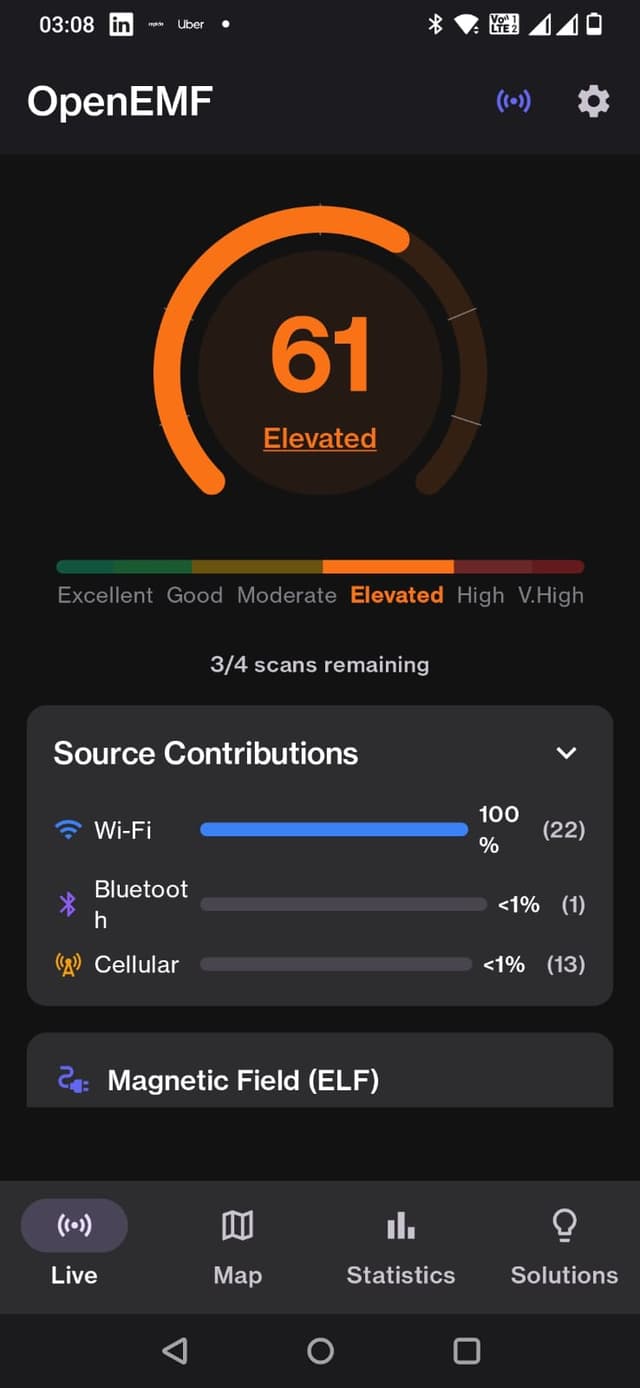
See It In Action
Clean, intuitive interface designed for quick understanding of your EMF environment.
Live Dashboard
Why Measure Your EMF Exposure?
You can't manage what you can't measure. Understanding your electromagnetic environment is the first step to making informed decisions about your health and technology use.
- Know your environment before choosing a home or office
- Track exposure changes over time
- Identify the biggest contributors to your EMF exposure
- Compare your readings to international safety standards
- Contribute anonymized data to help global EMF mapping
The E-Score System
Our E-Score provides a simple 0-100 rating of your total RF exposure, making it easy to understand your environment at a glance.
Download OpenEMF
Available for Android devices running Android 9.0 (Pie) or higher.
Direct Download
Download the APK directly and install manually.
Download APKVersion 1.0.0 • BSD 3-Clause
Build From Source
Clone the repo and build it yourself. Full transparency.
View on GitHubBSD 3-Clause License
System Requirements
Minimum
- • Android 8.0 (Oreo) or higher
- • WiFi-enabled device
- • Location permission
Recommended
- • Android 12+ for best Bluetooth support
- • Device with cellular modem
- • 5G capable for full cellular scanning
Permissions Needed
- • Location (for WiFi/cell scanning)
- • Bluetooth scan & connect
- • Nearby WiFi devices (Android 13+)
Installation Guide
Follow these steps to install OpenEMF on your Android device.
Installation Steps
- 1Download the
app-release.apkfile on your Android device - 2Go to Settings → Security → Install unknown apps and enable for your browser
- 3Open the downloaded APK file and tap Install
- 4Grant permissions when prompted (Location & Bluetooth)
- 5Start measuring your EMF exposure!
Testing Checklist
After installing, verify these features work:
- App launches without crash
- E-Score gauge displays and animates
- WiFi networks are detected (Sources tab)
- Bluetooth devices are found
- Map view loads (requires location)
- Statistics show measurement history
- Dark/light theme toggle works
Troubleshooting
"App not installed" error
Enable "Install unknown apps" in Settings for your browser
No WiFi networks found
Grant Location permission and enable GPS on device
No Bluetooth devices
Grant Bluetooth permission and enable Bluetooth
Map not loading
Enable Location services and grant permission
Security & Privacy
OpenEMF is designed with privacy as a core principle. Your data stays on your device.
No Data Collection
Zero analytics, tracking, or telemetry
Local Storage Only
All measurements stored on device
100% Open Source
Audit every line of code yourself
No Cloud Required
Works completely offline
How to Verify the APK is Safe
1. Scan with VirusTotal
Upload the APK to virustotal.com for a multi-engine scan
2. Monitor Network Traffic
Use NetGuard or PCAPdroid to verify only map tiles are fetched
3. Build From Source
Clone the repo and build the APK yourself for full trust
4. Check Permissions
Review the AndroidManifest.xml - only essential permissions
Frequently Asked Questions
Common questions about OpenEMF and EMF measurement. Click to expand.
Yes, completely free and open source under BSD 3-Clause license.
Yes, all measurements are done locally on your device. Internet is only needed to download the app.
Android requires Location permission to scan WiFi networks and cellular towers. This is an Android security requirement. Your location data stays on your device.
No, all data stays on your device. We don't collect any personal information or measurements.
Android throttles WiFi scans to 4 per 2 minutes (since Android 9). This is a system limitation we cannot bypass.
OpenEMF detects WiFi and Bluetooth signals, which some hidden cameras emit. However, it's not specifically designed for this purpose.
EMF levels vary based on proximity to routers, cell towers, and other devices. Moving away from sources reduces exposure.
No, iOS restricts access to WiFi and cellular scanning APIs, making a comparable app impossible.
The app uses your phone's built-in sensors. While not as precise as professional equipment, it provides reliable relative measurements for comparing environments.
The E-Score is calculated using ICNIRP reference levels with a logarithmic scale, providing a normalized 0-100 score where lower is better.
Features in Development
We're actively working on new features for upcoming releases.
Export data (CSV)
v1.0.0
Cloud sync & backup
v1.1.0
Global EMF heatmap
v1.1.0
Export data (PDF)
v1.1.0
Real-time exposure alerts
v1.2.0
Widgets for home screen
v1.2.0
Want to see the future vision?
Check out our interactive demo mockup to preview upcoming features and UI concepts.
View Demo MockupBeta Testing Program
OpenEMF is currently in beta. We're seeking early adopters to help test the app and provide feedback. Your input will directly shape the future of this tool.
v1.0.0
Beta Version
Free
Forever
Open
Source Code
Found a bug? Have a feature request? We'd love to hear from you!
Submit Feedback on GitHubReady to Know Your Environment?
Download OpenEMF today and start measuring your electromagnetic exposure. It's free, open source, and respects your privacy.